The Metronome by Soundbrenner
- 4.6
- Rating
- 5.00M
- Installs
- Free
- Price

 Analysis by App-foxy
I have always thought a metronome should disappear into the background: easy to start, easy to hear, and dependable enough that I can concentrate on playing instead of managing an app. The Metronome by Soundbrenner largely achieves that. It is a focused music practice app for Android, built around keeping time and helping musicians make practice more deliberate rather than simply tapping along to a beat.
My overall view is positive, with one important qualification. This is a strong choice if you want a modern metronome that feels more useful than a basic ticking utility, especially when you are trying to build a repeatable routine. It is less convincing if you only need the simplest possible tempo click and have no interest in practice tracking or optional paid extras.
Why the core metronome works so well
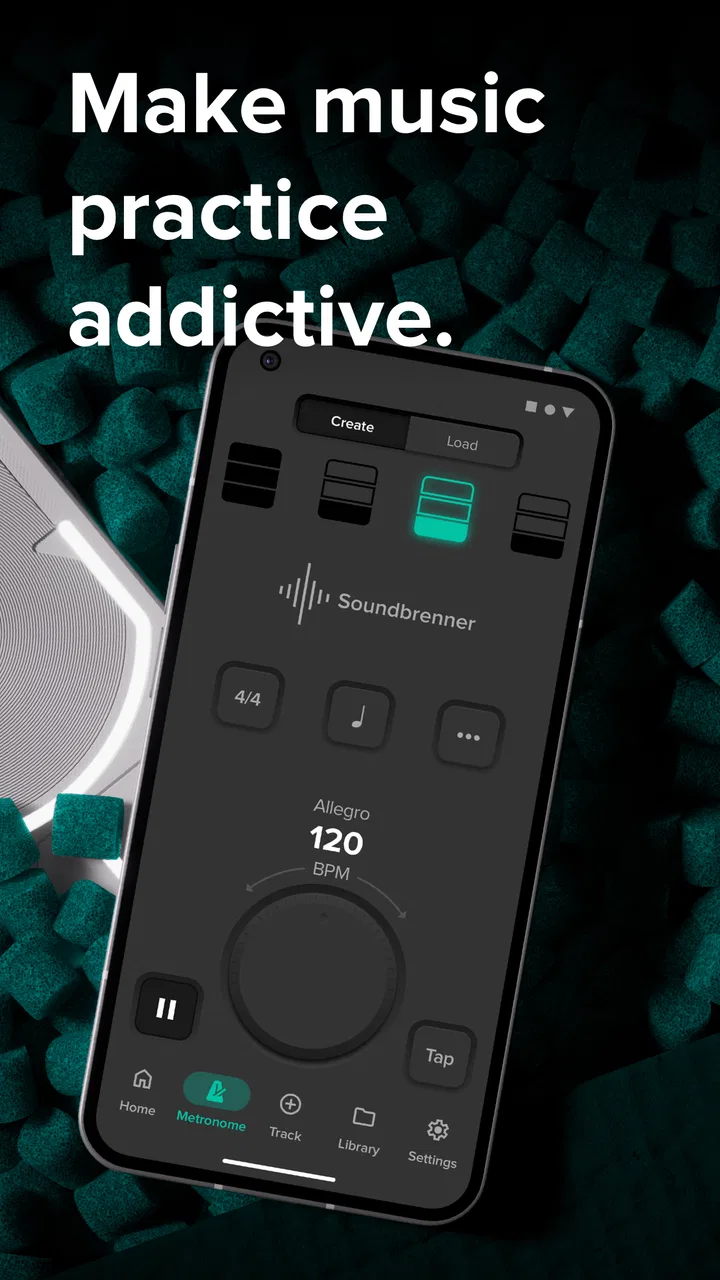
The first thing I noticed is how quickly I could get from opening the app to hearing a beat. That matters more than it sounds. A metronome is normally used in the middle of practice, when I do not want to navigate through a complicated interface, and Soundbrenner keeps the main task prominent. I can set a tempo, listen for the pulse, and begin playing without feeling as if I am configuring a studio system.
You May Also Like

 Blood Strike: 2.5 Anniversary
Blood Strike’s Loadouts Turn Every Drop Into a Tactical Gamble
A close look at Blood Strike’s custom loadouts: how fast access to signature weapons reshapes its battle royale rhythm, rewards preparation, and narrows the gap between fights.

 Pandora - Music & Podcasts
Pandora’s Music Is Easy to Start, but Harder to Recover
Pandora’s strength is its low-effort path from a seed to a station. Its weak spot is how much confidence it asks you to place in connection, setup, and quiet recovery.

 8 Ball Pool
 Is Built on Rivalries, Rematches, and Routine
A close look at the rivalries, rematches, shared routines, and unanswered safety questions that turn a quick pool match into a persistent mobile community.

 Samsung Music
’s Quiet Strength Is Playing What You Already Own
Its reach comes less from spectacle than from dependable access to a personal library. That simplicity is both the app’s strongest retention engine and its ceiling.

 AccuWeather: Weather Radar
AccuWeather Review: A Quick, Clear Forecast for Everyday Decisions
For everyday plans, the best forecast is the one you can understand quickly. AccuWeather makes rain timing, radar, and local conditions easy to act on, with a few trade-offs.

 Hill Climb Racing
Why Hill Climb Racing Still Turns Crashes Into One More Run
A tiny car, a bumpy hill and one more upgrade: Hill Climb Racing keeps resurfacing because its simple chaos makes every near-miss feel personal.
More From Our News Desk



The presentation is especially suitable for musicians who move between instruments. A guitarist, pianist, drummer, singer, or student working through scales all needs the same basic service: a steady reference that does not compete with the music. The app’s identity stays centered on that job. It does not try to become a streaming service, a lesson platform, or a social network.
That narrow focus gives it an advantage over many phone-based alternatives. A generic metronome can be perfectly functional, but it often feels like a disposable utility with a small click and little reason to return. Here, the practice-tracking angle gives the beat a purpose. I am not only asking, “What tempo should I use right now?” I am also encouraged to think about how consistently I practice and whether my sessions are becoming more structured.
For a beginner, this makes the app less intimidating than a physical metronome with unfamiliar controls. For an experienced player, it provides a convenient way to keep a reliable pulse available without carrying another device. I would still use a dedicated hardware metronome in situations where battery life, stage reliability, or tactile controls matter most, but for everyday work at home, the phone-based approach is practical.
A useful way to build a practice session
The most valuable feature for me is not the click itself; it is the way the app can support a progression. Instead of starting at an ambitious speed and repeatedly stopping when mistakes appear, I can begin at a tempo where the passage is comfortable, spend a focused block of time there, and then raise the challenge gradually. That turns the metronome from a background sound into a simple discipline.
A realistic example would be a guitarist working on a difficult chord change after dinner. I might spend the first few minutes playing once per beat, making sure the fingers arrive together. Then I could repeat the same movement with a more demanding subdivision, listening for whether the changes remain even. If the pattern falls apart, the sensible response is not to blame the app or push harder; it is to lower the tempo and regain control. The value of a practice tracker is that it encourages me to treat this as a session with a goal rather than random repetition.
This workflow also helps with short practice windows. When I only have fifteen minutes, I can choose one exercise, set a manageable pace, and avoid wasting half the session deciding what to do. The app does not magically create a practice plan, but it makes a plan easier to follow. That distinction is important: it is a tool for consistency, not a substitute for a teacher or a carefully designed method book.
Another practical insight is that a metronome can expose problems I do not hear when playing freely. I may believe a scale is even because the notes sound generally smooth, but a steady pulse reveals whether I rush difficult changes or drag through them. I find this particularly useful when recording myself. The click gives me a reference before I listen back, making it easier to separate timing problems from tone or technique problems.
Where it fits among ordinary alternatives
Compared with a physical metronome, the app wins on convenience and flexibility. My phone is already nearby, the display is easy to read, and I do not need to purchase or carry a separate unit. A hardware device still has meaningful advantages: it can be easier to operate with one hand, it does not compete with notifications, and it remains dedicated to the task. If you rehearse in loud rooms or perform live, those advantages can outweigh the convenience of an app.
Compared with a very basic free metronome, Soundbrenner offers a more complete practice-oriented experience. The difference is not necessarily that the click is more musical; a plain click can be perfectly adequate. The difference is that this app gives me more reason to use a metronome regularly. That matters for learners who know they should practice with a pulse but often forget, and for returning musicians trying to rebuild a routine.
Compared with a full digital audio workstation, it is much faster and less distracting. I would not use it to replace recording software, drum-machine programming, or detailed arrangement tools. That is not a weakness in itself. In fact, the limited scope is one of its strengths when I want to work on timing without opening a large production environment.
The app comes from Soundbrenner, a developer already associated with musician-focused tools, and it has reached a substantial audience: more than five million installs and an average rating of 4.6 from roughly ninety thousand ratings. Those figures do not guarantee that every player will like the interface, but they do suggest that the basic concept has proved useful to a broad range of musicians.
Small habits that make it more effective
I would not begin by chasing speed. A better approach is to select a tempo at which every repetition is clean, then keep the pulse running while paying attention to relaxed movement. If the exercise is a scale, I listen for equal note lengths. If it is a strumming pattern, I check whether the hand continues moving even when a chord change is difficult. The app is most helpful when I use the beat to observe technique, not merely to measure how fast I can go.
I also recommend using the metronome in more than one musical role. During warm-ups, a moderate pulse can keep simple exercises from becoming careless. During repertoire practice, a slower setting can reveal coordination problems. During a final run-through, the original performance tempo can show whether the work survives outside the comfort zone. Reusing one tempo for everything makes the click less informative.
A less obvious benefit is that the practice record can help identify patterns across days. If I repeatedly struggle with the same passage, the problem may not be a lack of effort; it may be that the chosen exercise is too broad, the tempo jumps are too large, or I am practicing when tired. A record cannot diagnose that for me, but it gives me something more useful than a vague feeling that progress is slow.
For ensembles, I would treat the app as a preparation tool rather than a replacement for rehearsal. Each player can work privately with a stable pulse, then bring that internal sense of time to the group. It is particularly useful before recording a part, because practicing with the intended pulse can make entrances and pauses more dependable. Still, ensemble timing also depends on listening and breathing together, which no metronome can provide by itself.
The limitations I would consider first
The biggest limitation is that a metronome, even a well-designed one, can become a crutch. If I always follow the click without learning to feel subdivisions internally, I may sound accurate only while the pulse is present. The best use is to alternate between playing with the beat and briefly testing whether the timing remains stable when the sound is removed or paused. The app can support that habit, but it cannot enforce it.
There is also a practical phone problem. Notifications, incoming calls, low battery, or an accidental swipe can interrupt a session in a way a dedicated device would not. I find it wise to silence distractions before starting, especially when using the app for concentrated work. This is not unique to Soundbrenner, but it is part of the real trade-off of choosing a mobile metronome.
The free price makes the app easy to try, but optional in-app purchases range from $4.99 to $199.99 per item. That is a wide range, and it means I would examine the purchase screen carefully before committing to anything. A musician who only wants a dependable click may feel that the free experience is enough, while someone interested in the broader practice ecosystem may find the paid options worthwhile. I would not pay automatically simply because the app has extra tools; I would first decide whether those tools change my actual routine.
Another point is that the app may be more than some users need. If your only requirement is a large number, a loud click, and instant access, a simpler metronome could feel cleaner. Extra practice-oriented elements are useful only when they encourage behavior you genuinely want to maintain. For a professional who already has a carefully organized practice system, the app may be convenient but not essential.
Audio context matters too. A phone speaker can work for quiet solo practice, but it may not cut through a loud instrument or a room shared with other musicians. Headphones can solve that in many situations, although they change how naturally I hear my own playing. For drummers and amplified performers, I would test the app in the actual environment before relying on it. A metronome that is clear in a bedroom may be difficult to follow in rehearsal.
Who should use it, and who should skip it
I think this is particularly well suited to beginners who need help making practice measurable. The interface is less intimidating than a large production app, while the tracking concept gives them a reason to return. Teachers could also suggest it for students who practice inconsistently, provided the student understands that logging time is not the same as improving technique.
It is equally useful for intermediate players who have reached the frustrating stage where mistakes appear only at higher tempos. The answer is often controlled repetition, and a stable pulse makes that work easier to organize. Players learning solos, fingerstyle patterns, rudiments, scales, or vocal exercises can all benefit from the same basic method.
I would also recommend it to musicians who travel between home, lessons, and rehearsal. The phone format removes one item from the equipment bag, and the free starting point lowers the risk of trying it. The age rating is Everyone, so it is accessible to young learners as well as adults, though a teacher or parent may still want to help a child turn the tool into a sensible routine.
I would be more cautious about recommending it to someone who dislikes phone distractions or needs a device for performance-critical work. A hardware metronome may be the better choice if you want physical buttons, predictable battery behavior, or complete separation from messages and apps. I would also steer away from it if you are looking for guided lessons, detailed notation, or a full library of backing tracks; this is a metronome and practice companion, not an all-in-one music school.
What to expect from the current app
The app has been available since December 15, 2015, and the current version is 1.33.2. On Android, it requires version 10 or later. That is worth checking before installation, especially if you use an older phone for music. The app itself is free to download, with optional purchases available inside it, so the sensible first step is to use the core experience during several real practice sessions rather than judging it after a single quick launch.
I would test it with three different situations: a quiet technical exercise, a passage that regularly causes rushing, and a louder instrument or room. Those tests reveal more than simply checking whether the click starts. They show whether the sound is comfortable, whether the display is easy to follow, and whether the practice tools fit the way you actually work. If all three feel natural, the app is likely to become useful rather than remain another icon on the phone.
One final recommendation is to keep the app’s role modest. I would use it to create a dependable pulse, record or reflect on practice, and make gradual tempo decisions. I would not let a number become the only measure of progress. Better timing, relaxed technique, cleaner transitions, and musical phrasing matter more than reaching a particular speed, and the metronome is valuable precisely because it helps reveal those qualities.
After using The Metronome by Soundbrenner as a practice tool rather than just a ticking clock, I see why it appeals to so many musicians. It is quick to use, focused on the central need, and more motivating than a bare-bones alternative when I want to build a regular routine. Its free entry point is generous enough to make trying it easy, while the optional purchases deserve a deliberate look instead of an automatic upgrade.
My recommendation is clear: choose it if you want a convenient metronome for Android music practice with a stronger sense of progress than a basic click provides. Skip it in favor of hardware or a simpler utility if you need absolute minimalism, performance-grade independence, or no tracking-oriented layer at all. For learners, hobbyists, and developing players, though, it is a practical companion that can turn “I should practice with a metronome” into a habit I can actually maintain.
FAQs for The Metronome by Soundbrenner
01What is The Metronome by Soundbrenner, and who is it designed for?
The Metronome by Soundbrenner is a digital metronome for musicians, singers, dancers, and anyone practicing rhythm. It offers adjustable tempo, beat patterns, subdivisions, accents, and visual or vibration feedback. During testing, its clean interface made it suitable for beginners, while more advanced controls gave experienced players enough flexibility for practice, rehearsals, and performance preparation.
02Can I use The Metronome by Soundbrenner without an internet connection?
Yes, the core metronome functions can generally be used offline once the application is installed. You can set the tempo, choose a time signature, and practice without relying on mobile data or Wi-Fi. However, certain account-related features, synchronization options, updates, or connected Soundbrenner hardware functions may require an internet connection, so offline availability can vary by feature.
03Does the app support different time signatures, subdivisions, and complex rhythms?
The app is more capable than a basic click track. It supports a wide range of tempos, time signatures, beat groupings, accents, and subdivisions, allowing musicians to practice simple grooves as well as more demanding rhythmic patterns. These controls are especially useful for working on odd meters, syncopation, polyrhythmic ideas, and gradually increasing speed with greater accuracy.
04Can The Metronome by Soundbrenner connect to wearable metronomes or other devices?
One of the app’s main advantages is its relationship with Soundbrenner’s connected metronome ecosystem. Compatible wearable devices can provide tactile vibration, allowing you to feel the beat instead of relying only on sound or looking at the screen. Compatibility and available controls depend on the specific Soundbrenner product, phone, operating system, and current app version.
05Is The Metronome by Soundbrenner free to download, and are there paid features?
The application can typically be downloaded at no initial cost, but some advanced tools, premium options, account features, or hardware-related functions may be limited depending on the current version and platform. Before downloading, check the Google Play Store or Apple App Store listing for subscriptions, in-app purchases, and device requirements. The basic timing functions are generally the most accessible part of the app.
Pros
- Accurate timing with clear visual
- vibration
- and audio cues.
- Tap tempo quickly detects the rhythm of a song or practice idea.
- Customizable accents help reinforce complex meters and subdivisions.
- Works well for musicians at beginner and advanced skill levels.
- Clean interface makes tempo changes fast during rehearsals.
Cons
- Some advanced features may require a paid subscription.
- Vibration can noticeably drain the battery during long sessions.
- Loud environments may make the built-in sound difficult to hear.
- The many settings can feel overwhelming for first-time users.
- Bluetooth features may depend on compatible Soundbrenner hardware.

The Metronome by Soundbrenner
Gallery